
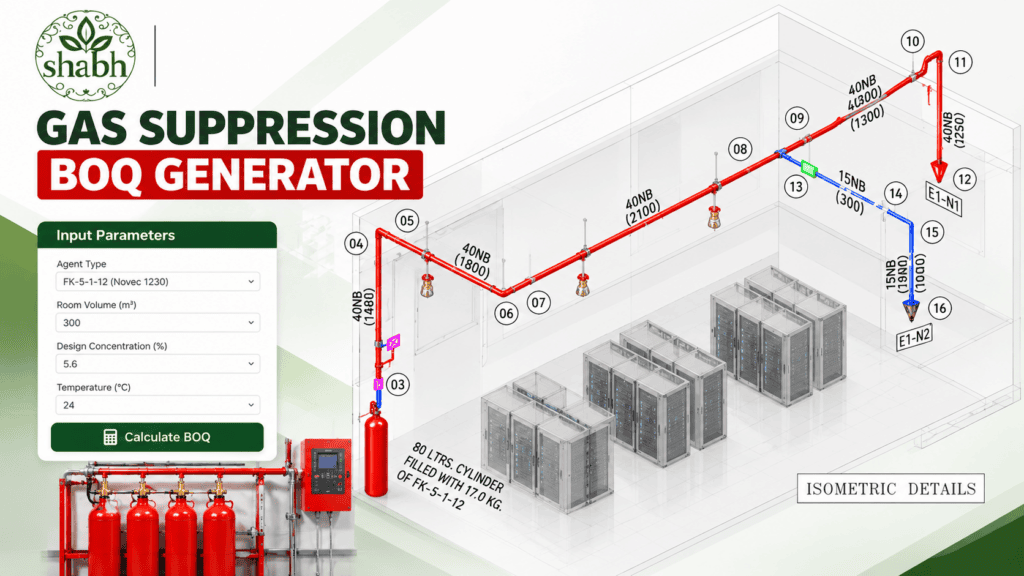
Standard Operating Procedure (SOP): How to Use the Gas Suppression BOQ Generator
This standard operating procedure outlines the step-by-step instructions for utilizing the Shabh Creations Clean Agent Fire Suppression Engineering Calculator to generate preliminary bills of quantities (BOQ) and design schedules.

Shabh Creations Private Limited
NFPA 2001 Clean Agent Fire Suppression Engineering Calculator
Gas Suppression BOQ Generator
Please enter your professional email to instantly unlock our professional clean agent calculator.
What You Get Instantly:
- Precise Zone Dimensions: Input dimensions for main rooms, ceiling voids, and floor voids.
- Brand & Cylinder Selection: Choose from major manufacturers (Ansul, Kidde, Ceasefire, Cryptzo) and brand-certified cylinder profiles.
- Complete Hardware Schedule: Get exact counts for cylinder sizes, fill densities, discharge nozzles, and smoke detectors.
- Instant Estimation: Automatically generate a comprehensive hardware schedule with accurate cost estimations.
Step 1: Configure System-Wide Parameters
- Project Name: Enter a unique project identifier (e.g., Data Center Alpha).
- Extinguishing Agent: Select the required clean agent:
- FK-5-1-12 (Novec 1230)
- HFC-227ea (FM-200)
- Operating Pressure: Choose between 25 Bar or 42 Bar system configurations.
- Unit of Measurement: Select your preferred dimensional unit (Metres or Feet).
Step 2: Input Hazard Zone & Room Dimensions
- Zone / Room Name: Specify the protected area (e.g., Server Room 1).
- Main Room Dimensions: Input the clear internal Length, Width, and Height of the protected room.
- Void Dimensions (Optional): Input dimensions for Ceiling Voids or Floor Voids if applicable. You can check the “Same as Main” box to quickly sync floor or ceiling dimensions if they match the main room footprint.
- Fire Hazard Class: Select the appropriate hazard classification (Class A, Class B, or Class C). The tool will automatically apply the correct NFPA 2001 design concentration percentage.
- Nozzle Coverage & Pipe Run: Select your nozzle coverage type (360° radial or 180° sidewall) and enter the remote pipe run distance from the cylinder bank to automatically factor in hydraulic allowances.
- Click “+ Add Zone & Calculate” to process the data.
Step 3: Review the Engineering Reports
Once the zone is added, the automated report instantly populates three professional sections below:
- Design Schedule: Displays exact volumes, actual agent mass requirements, stored weights, cylinder sizes, and fill densities conforming to strict NFPA limits.
- Nozzle Details Schedule: Outlines recommended nozzle placements, sizes, and drill designations.
- Master Bill of Quantities (BOQ): Provides a comprehensive itemized list of cylinders, brackets, discharge nozzles, actuators, and smoke detectors required for the installation.
⚠️ Engineering Note: This tool is for absolutely rough estimation purposes only and shall not be used as a final engineered BOQ or for direct site execution without certified hydraulic calculations.
A precision web utility engineered for:
fire protection professionals, consultants, and contractors. This automated clean agent fire suppression calculator adheres strictly to NFPA 2001 standards, enabling you to accurately compute agent quantities, cylinder requirements, fill densities, and accessory schedules for FK-5-1-12 (Novec 1230) and HFC-227ea (FM-200) systems across main rooms, ceiling voids, and floor voids.
Frequently Asked Questions (FAQ)
1. What is the Gas Suppression BOQ Generator?
This is an online engineering utility designed for fire protection professionals, consultants, and contractors to instantly calculate clean agent volumes, cylinder requirements, and bills of quantities (BOQ) for automated fire suppression systems.
2. Which standards are used for these calculations?
All calculations strictly adhere to NFPA 2001 (Standard on Clean Agent Fire Extinguishing Systems) guidelines, incorporating standard design concentrations for Class A, Class B, and Class C (energized electrical/IT) hazards.
3. Does the calculator account for ceiling and floor voids?
Yes. You can independently input dimensions for the Main Room, Ceiling Void, and Floor Void. The tool aggregates the total volume to determine the precise quantity of gas required to protect the entire enclosure.
4. How do Cylinder Size (Litres) and Stored Gas Quantity (Kilograms) relate?
Litres (L) represent the physical water-capacity volume of the steel storage cylinder.
Kilograms (Kg) measure the actual mass of the liquid extinguishing agent stored inside.
The calculator automatically enforces safe Maximum Fill Density limits (e.g., $1.12 \text{ kg/L}$ for 25-bar systems and $1.40 \text{ kg/L}$ for 42-bar systems) to ensure cylinders are never overfilled.
5. Which clean extinguishing agents are supported?
The tool supports major chemical agents, including FK-5-1-12 (Novec 1230) and HFC-227ea (FM-200), configurable for both 25-Bar and 42-Bar system pressures.
6. Can this generated BOQ be used for final site execution?
No. As noted in our engineering disclaimer, this tool is intended for rough estimation and preliminary budgeting purposes only and shall not be used as a final engineered BOQ. Final hydraulic flow calculations and system installations must be performed by certified specialists.